4 Steps to Telephone Authentication
This article explains how you can use the telephone to authenticate users, using the TeleAuth web-service.
TeleAuth provides an API that allows you to call a user and request a numeric secret in real-time. It can be used within web-based applications, console apps, or for network services.
It can also be used with online shopping sites to do things like collecting credit-card information, or delivering pass-codes.
Step 1. Sign Up
Visit http://www.teleauth.com and sign up for a beta account.
Step 2. Create an API Key
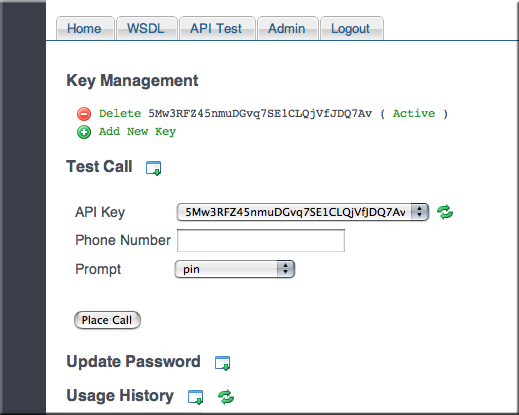
Log into your account, and click the "Add New Key" link. A new API key will be generated for you to use in your SOAP or XML-RPC requests.
Step 3. Test It
Expand the "Test Call" tab, and select an API Key. Then, enter a North American phone number, and select a prompt. The prompts are what the receiver hears when he/she receives a call (e.g., "Enter PIN code", or "Enter your credit-card number").
Click "Place Call" to initiate the phone call. The call status is updated in real-time on the page.
The phone should receive a call in a matter of seconds. Answer it, and enter some digits on the dial-pad. As soon as you hit the "#" key, you should see the result on the page.
Step 3. Try Some Code
Here's a simple Ruby program that calls a phone number and requests a PIN code:
#!/usr/bin/env ruby

require 'soap/wsdlDriver'
require 'cgi'

WSDL_URL = "http://teleauth.com/phone/service.wsdl"
soap_client = SOAP::WSDLDriverFactory.new(WSDL_URL).create_rpc_driver

# Log SOAP request and response
soap_client.wiredump_file_base = "soap-log.txt"

# Place the phone call
response = soap_client.getSecret( "SKJDekqQ4wUBiJEGFpkgA8Ph0bkkAXb",
    "15556673323", "pin")

# Display reponse
puts response.result, " / ", response.secret, " / ", response.message
Above, we use the SOAP WSDL-schema from http://teleauth.com/phone/service.wsdl, and call the "GetSecret" method. The parameters we provide are: the API key, a phone number, and a voice-prompt.
The return values are:
result: The result code. Usually "OK", or "ERROR".
secret: The digits dialed on the key-pad (PIN code, credit-card number).
message: An error message, if the result was "ERROR".
Step 4. Use It
And there we have it. TeleAuth supports both SOAP and XML-RPC. Use it with Rails. Use it with Java. Use it with Z80 Assembler if you wish.
The service is currently in beta, and is currently looking for testers.
Enjoy.