A Music Theory API
Most of my work last week consisted of writing music theory code. VexFlow now has a neat little music theory API, that gives you answers to questions like the following:
- What note is a minor 3rd above a B?
- What are the scale tones of a Gb Harmonic Minor?
- What relation is the C# note to an A Major scale? (Major 3rd)
- What accidentals should be displayed for the perfect 4th note of a G Major scale?
- etc.
The API is part of VexFlow, and can be used independently of the rendering API. Take a look at music.js in the VexFlow GitHub repository for the complete reference. There's also a handy key management library for building scores in keymanager.js.
I'm currently working on updating the VexFlow Tutorial with a quickstart on the music theory API, but meanwhile, here are some teasers (pulled straight out of the tests).
// What does C note consist of?
var parts = music.getNoteParts("c");
equals(parts.root, "c");
equals(parts.accidental, null);

// What does C# note consist of?
var parts = music.getNoteParts("c#");
equals(parts.root, "c");
equals(parts.accidental, "#");

// What is a flat-5th above C?
var value = music.getRelativeNoteValue(music.getNoteValue("c"),
                                       music.getIntervalValue("b5"));
equals(value, music.getNoteValue("gb");
equals(value, music.getNoteValue("f#");

// What is the C quality of a Db?
equals(music.getRelativeNoteName("c", music.getNoteValue("db")), "c#");

// What are the tones of a C major scale?
var c_major = music.getScaleTones(
      music.getNoteValue("c"), Vex.Flow.Music.scales.major);
// result: ["c", "d", "e", "f", "g", "a", "b"]

// What is the interval between a C and a D?
equals(music.getCanonicalIntervalName(music.getIntervalBetween(
     music.getNoteValue("c"), music.getNoteValue("d"))), "M2");
Thanks to the theory support, we now have smarter Accidentals in the standard notation stave that VexTab generates.
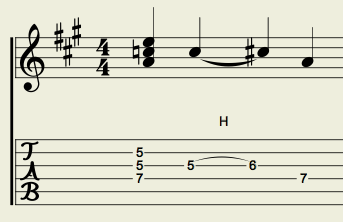
Smarter Accidentals
Notice how the accidentals are correctly picked according to the rules of standard notation? Yep, so do I.
We also have lots more tests -- over 750 of them! Try running them on your browser and tell me how long it takes.
That's all folks!
19 comments (imported from blogger)
754 tests of 754 passed, 0 failed.
Mozilla/5.0 (Windows; U; Windows NT 6.1; en-US) AppleWebKit/534.16 (KHTML, like Gecko) Chrome/10.0.648.204 Safari/534.16
------------
Google Chrome 12.0.712.0 dev
Mozilla/5.0 (Windows NT 6.1; WOW64) AppleWebKit/534.27 (KHTML, like Gecko) Chrome/12.0.712.0 Safari/534.27
Tests completed in 1866 milliseconds.
754 tests of 754 passed, 0 failed.
------------
Firefox 4.0
Mozilla/5.0 (Windows NT 6.1; WOW64; rv:2.0) Gecko/20100101 Firefox/4.0
Tests completed in 5200 milliseconds.
754 tests of 754 passed, 0 failed.
------------
IE 9
Mozilla/5.0 (compatible; MSIE 9.0; Windows NT 6.1; Win64; x64; Trident/5.0; .NET CLR 2.0.50727; SLCC2; .NET CLR 3.5.30729; .NET CLR 3.0.30729; Media Center PC 6.0; Tablet PC 2.0; .NET4.0C; .NET4.0E; InfoPath.3)
Tests completed in 3388 milliseconds.
218 tests of 248 passed, 30 failed.
------------
Opera 11.01
Opera/9.80 (Windows NT 6.1; U; en) Presto/2.7.62 Version/11.01
Tests completed in 2000 milliseconds.
754 tests of 754 passed, 0 failed.
------------
Tests completed in 2561 milliseconds.
754 tests of 754 passed, 0 failed.
(Firefox 4, Mac OS X 10.6)
Mozilla/5.0 (Macintosh; U; Intel Mac OS X 10_6_6; en-US) AppleWebKit/534.16 (KHTML, like Gecko) Chrome/10.0.648.204 Safari/534.16
Running Chrome with WAY too many tabs open.. at least 40+
It's really coming along! We should get together again. I've moved back to the city actually and am living out in Williamsburg.
Tests completed in 4093 milliseconds.
754 tests of 754 passed, 0 failed.
This is on an ancient 1.26 GHz P3 machine though.
Congratulations and keep up the good work.
Tests completed in 1367 milliseconds.
754 tests of 754 passed, 0 failed.
Would like to say that your work is awesome!
Tests completed in 1377 milliseconds.
754 tests of 754 passed, 0 failed.
AWESOME lib. Can't wait to put it to use.
Mozilla/5.0 (Macintosh; Intel Mac OS X 10_7_4) AppleWebKit/534.57.2 (KHTML, like Gecko) Version/5.1.7 Safari/534.57.2
Tests completed in 4335 milliseconds.
894 tests of 894 passed, 0 failed.
All Tests on the same Machine (i5 - 2320@3GHz):
I had time differences up to 400ms when actualizing the page. But the results here represent a average overview. Safari seems to be the fastest. Opera the slowest.
*** FIREFOX:
Mozilla/5.0 (Windows NT 6.1; rv:16.0) Gecko/20100101 Firefox/16.0
Tests completed in 4118 milliseconds.
1565 tests of 1565 passed, 0 failed.
*** CHROME:
Mozilla/5.0 (Windows NT 6.1) AppleWebKit/537.11 (KHTML, like Gecko) Chrome/23.0.1271.91 Safari/537.11
Tests completed in 3383 milliseconds.
1565 tests of 1565 passed, 0 failed.
*** OPERA:
Opera/9.80 (Windows NT 6.1) Presto/2.12.388 Version/12.11
Tests completed in 4509 milliseconds.
1565 tests of 1565 passed, 0 failed.
*** IE9:
Mozilla/5.0 (compatible; MSIE 9.0; Windows NT 6.1; Trident/5.0; SLCC2; .NET CLR 2.0.50727; .NET CLR 3.5.30729; .NET CLR 3.0.30729; Media Center PC 6.0; .NET4.0C)
Tests completed in 4289 milliseconds.
1565 tests of 1565 passed, 0 failed.
*** SAFARI:
Mozilla/5.0 (Windows NT 6.1) AppleWebKit/534.57.2 (KHTML, like Gecko) Version/5.1.7 Safari/534.57.2
Tests completed in 2836 milliseconds.
1565 tests of 1565 passed, 0 failed.
Tried to download and run locally uing vexflow-master.zip. same error.
OS and Browsers: Linux using FireFox and Chrome, same problem in both. The rest of the site works fine.
I finally got my local version working by downloading vextab and copying some files across.
(Same environment as above.)
Is there somewhere better to post bugs like this? Is there a help forum?
It would be good if the sanbox had a clear button.
Best place to report issues is at the GitHub repo: http://github.com/0xfe/vexflow
(Clear button is a good idea -- will add.)