Digraphs in Vim
Ever wondered how to use digraphs to insert characters such as ⇐ or ⅛ into text files with Vim?
Simple - use the key combination Ctrl-Kfollowed by the two-letter digraph code directly in insert mode.
For example, Ctrl-K DE generates ∆ and Ctrl-K 23 generates ⅔.
For a list of all the available digraphs and their key codes, use the command ":dig".
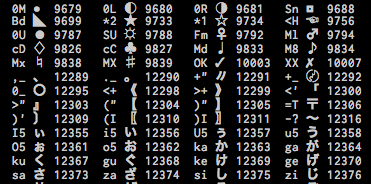
Sample Digraph Codes
The ability to insert digraphs directly into the editor opens up a lot of possibilities for customization. For example, to make tabs and trailing whitespace characters visible in code, you can add something like this to your .vimrc.
" Show tabs and trailing spaces.
" Ctrl-K >> for »
" Ctrl-K .M for ·
" (use :dig for list of digraphs)
set list listchars=tab:»»,trail:·
Here's what it looks like:

Using Digraphs to see Whitespace Characters
Digraphs are fun. Vim is fun. Digraphs + Vim = ∏☺♣☆は℞ψ. For more on digraphs in Vim, visit the vim digraph page.
3 comments (imported from blogger)
also it's good to know that these characters tend to be problematic on misconfigured or non-unicode terminals.
most common case for this is PuTTY on Windows, here's some info to deal with that: http://www.linux.com/community/blogs/improving-putty-settings-on-windows.html