Simple Code Folding in Vim
I've been on a Vim customization frenzy the last few days, and I just discovered an uber-cool feature: code folding. Folding is the process of rolling up a block of lines in the buffer, to a single line.
Here's what folded code looks like:
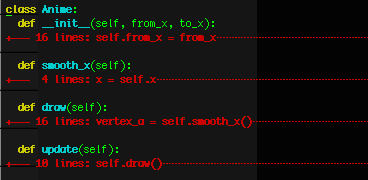
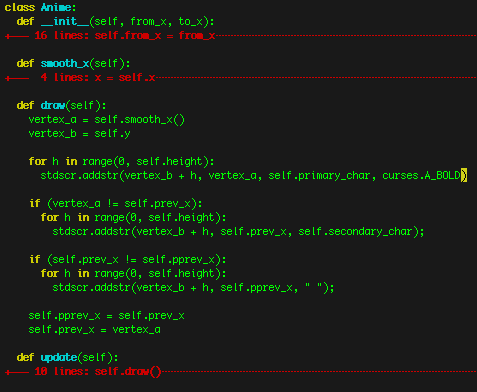
So, to unfold a block, simply move the cursor to the block and hit "zO". (All the fold commands begin with "z"). Here's what an unfolded block looks like:
There are many ways to fold code, but the simplest way to enable it is by setting the foldmethod option to indent. This folds code based on its indentation.
If you're looking for syntax-aware folding, you can set fold-method to syntax. This generally takes a little more tweaking to get the right fold behaviour.
Add the following to your .vimrc, to get simple straightforward indentation-based code folding:
" Enable folding by indentation
" Use: zc, zo, zC, zO, zR, zM
" Ctrl-K .3 for ⋯
set foldmethod=indent
highlight Folded ctermfg=red
highlight FoldColumn ctermfg=white
set fillchars=fold:⋯
For more information about code folding, and to get a list of all the commands, see http://www.vim.org/htmldoc/usr_28.html.
3 comments (imported from blogger)
I took it out because it kept changing. I'll follow up with a *link* to my .vimrc instead.